MakeCode Arcade is a free, browser-based platform from Microsoft that lets anyone design and code retro-style 2D video games using drag-and-drop blocks or JavaScript. It runs directly at arcade.makecode.com, so there is nothing to install, and it works on Windows, Mac, Chromebooks, and even some handheld coding devices. Built for beginners but flexible enough for experienced programmers, MakeCode Arcade turns coding lessons into playable games students can share and remix with friends or classmates.
What Is MakeCode Arcade?
MakeCode Arcade is a web-based game development environment created by Microsoft as part of its broader MakeCode family of learn-to-code tools. It gives users a built-in code editor, a live game simulator, and a library of sprites, sounds, and templates so a new game idea can go from blank screen to playable prototype in minutes.
The platform is aimed squarely at learners. Its block-based interface mirrors the puzzle-piece logic found in Scratch, but it also lets users switch to real JavaScript code, which makes it useful for students moving from visual programming into text-based languages.
How Does MakeCode Arcade Work?
MakeCode Arcade works by combining a visual block editor, a JavaScript text editor, and a real-time simulator in one browser window. As a user drags blocks or types code, the simulator on the same screen updates instantly, showing exactly how the game behaves without needing to compile or export anything separately.
Under the hood, MakeCode Arcade is powered by Microsoft’s open source Programming Experience Toolkit (PXT), which converts block code into JavaScript and compiles it to run in the browser or on supported hardware. This same engine also drives other MakeCode editors, including those for micro:bit devices, which is why skills learned in Arcade often transfer to other MakeCode projects.
What Can You Build in MakeCode Arcade?
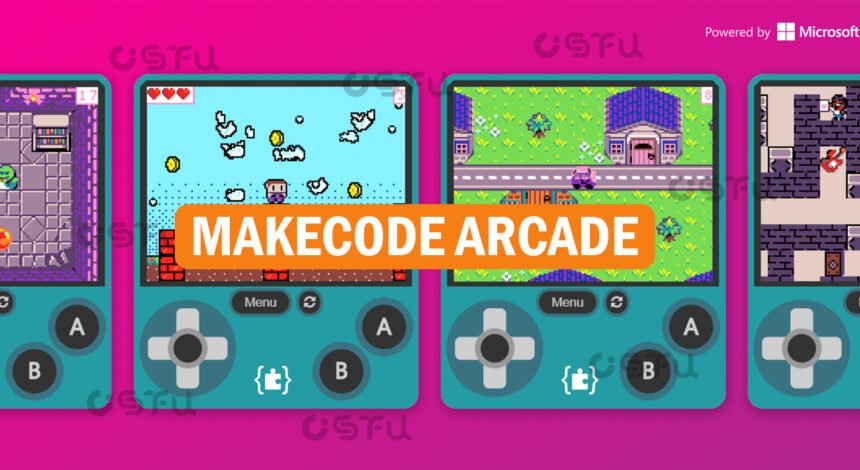
Users can build retro-style arcade games such as mazes, platformers, shooters, and collector games, the kind of pixel-art titles reminiscent of classic 8-bit consoles. The editor includes a sprite designer, tilemap tools for building levels, and a sound editor, so a full game with graphics, movement, scoring, and audio can be created without any outside software.
Finished games run in any modern browser and can also be exported to a handful of supported handheld devices that use the MakeCode Arcade hardware platform. Completed projects can be shared publicly through the MakeCode gallery or community forum, where other users can play them or copy the code to learn from it.
Who Uses MakeCode Arcade?
MakeCode Arcade is used mainly by students, teachers, and self-taught beginners who want a low-barrier way to learn programming concepts through game design. Microsoft markets it heavily to K-12 classrooms, and it appears in curricula built around the College Board’s AP Computer Science Principles course for high school students.
Coding clubs, libraries, and after-school programs also use it because it requires no purchase, account fees, or software installation. Hobbyist coders and hardware tinkerers use it too, since the platform’s open source codebase on GitHub allows advanced users to build custom extensions and hardware integrations.
Is MakeCode Arcade Good for Beginners?
MakeCode Arcade is well suited to beginners because its block-based mode removes the syntax errors that often frustrate new coders while still teaching real programming logic like loops, variables, and conditionals. Sprites, movement, and collision detection are handled through prebuilt blocks, so a first game can be working within a single class period.
As confidence grows, the same project can be viewed and edited in JavaScript, giving learners a direct bridge from visual blocks to a real, widely used programming language. This side-by-side toggle between Blocks and JavaScript is one of the platform’s most distinct teaching features compared with similar tools.
How Do You Get Started with MakeCode Arcade?
Getting started requires only a browser and a visit to arcade.makecode.com, where new users are greeted with a home screen full of guided tutorials ranging from simple greeting-card projects to more involved maze and collector games. No sign-in is required to start building, though projects can be saved locally or shared through a generated link.
Most beginners are advised to complete one or two of the built-in tutorials first, since these walk through sprite placement, scoring, and game logic step by step. From there, users typically move on to small original projects before attempting a full game, sketching out an idea on paper before building it in the editor.
Conclusion
MakeCode Arcade gives anyone a free, no-install way to learn programming by building real, playable retro games. Its combination of block-based simplicity and a genuine JavaScript editor makes it a practical starting point for classrooms and self-taught coders alike, while its open source foundation keeps it flexible for more advanced projects. For a hands-on next step, visiting the official Microsoft MakeCode Arcade site and working through a beginner tutorial is the fastest way to see how it works.
Frequently Asked Questions
Is MakeCode Arcade completely free to use?
Yes. MakeCode Arcade is free for anyone to use, with no account, subscription, or purchase required to build, play, or share games. It runs entirely in a web browser at arcade.makecode.com, making it accessible to schools and individual learners at no cost.
Does MakeCode Arcade require prior coding experience?
No prior experience is needed. The block-based editor is designed for first-time coders, walking users through prebuilt tutorials that teach core programming concepts through game creation rather than abstract lessons.
Can MakeCode Arcade games run on real hardware?
Yes, in some cases. MakeCode Arcade supports export to a limited set of compatible handheld devices built specifically for the platform, in addition to running in any modern desktop or laptop browser.
What programming language does MakeCode Arcade use?
MakeCode Arcade offers two coding modes: a drag-and-drop block editor and a JavaScript text editor. Users can switch between them on the same project, which helps beginners transition from visual blocks to written code.
Is MakeCode Arcade only for kids?
While it is popular in K-12 classrooms and after-school programs, MakeCode Arcade is not restricted to children. Its open source foundation and JavaScript support also attract older students, hobbyist developers, and educators building custom coding curricula.