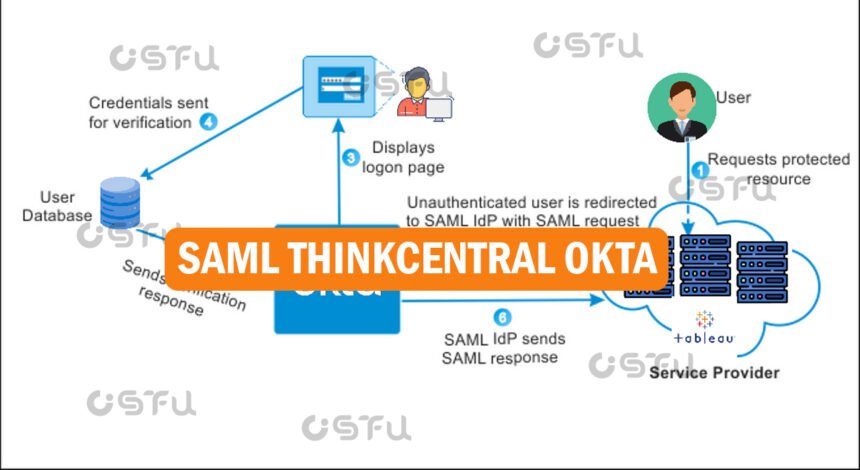
SAML ThinkCentral Okta refers to the single sign-on (SSO) setup that lets schools and districts use Okta as an identity provider so students, teachers, and administrators can log into HMH ThinkCentral without a separate username and password. In short, Okta authenticates the user first, then passes a secure SAML token to ThinkCentral, which trusts that token and grants access automatically. This setup is common in K-12 technology environments where a district already manages student and staff accounts through Okta and wants every learning platform, including ThinkCentral, to share that same login.
What Is SAML?
Security Assertion Markup Language, or SAML, is an open XML-based standard used to exchange authentication data between an identity provider and a service provider. In this pairing, Okta acts as the identity provider that verifies who the user is, while HMH ThinkCentral acts as the service provider that accepts Okta’s confirmation and opens the account.
SAML does not send passwords between systems. Instead, it sends a signed assertion, a small encrypted message confirming the user’s identity, which ThinkCentral checks against a trusted certificate before letting the person in.
How Does ThinkCentral Use SAML for Single Sign-On?
ThinkCentral supports SAML-based SSO so districts can connect it to an identity provider such as Okta, ClassLink, or a district’s own identity management system. When an organization uses single sign-on credentials to access ThinkCentral, users log in once to reach all of their organization’s platforms, which for HMH includes ThinkCentral, HMH Ed, and myHRW.
This matters for teachers and IT staff because it removes the need to manage a second password just for HMH content. Instead, ThinkCentral relies on the trust relationship already built between the district’s Okta instance and HMH’s SAML configuration.
How Do You Set Up SAML ThinkCentral Okta Integration?
Setting up this integration means building a trust connection between Okta and HMH, then applying it inside ThinkCentral. While exact steps vary by identity provider, the general process for connecting an identity provider to HMH platforms follows a consistent pattern.
An administrator first creates a SAML application inside the identity provider, generates or uploads a certificate, and copies the resulting metadata URL. That metadata is then used to create a new HMH SAML connection, generating a new HMH SAML URL and metadata, and target URLs for the HMH applications. HMH’s support team typically works directly with the district’s technical contact to finish linking the two systems, since HMH must register the identity provider on its end before login attempts succeed.
What Problems Come Up With SAML ThinkCentral Okta Logins?
The most common issue is a login failure tied to a misconfigured connection rather than a wrong password. Okta Error 400 issues, including “Login Failed,” “Bad Request,” and “Error Code: GENERAL_NONSUCCESS,” can occur when there is an error in the Okta configuration, and HMH recommends contacting technical support directly when this happens.
Other issues include outdated certificates, mismatched entity IDs, or a metadata URL that changed on one side without updating the other. Because SAML depends on both systems agreeing on identical values, even a small mismatch, like an expired certificate, can block every user from logging in until an administrator corrects it.
Who Is Responsible for Managing This Integration?
District IT administrators, not individual teachers, typically own the SAML ThinkCentral Okta connection. They coordinate with HMH support to exchange metadata, renew certificates, and troubleshoot login errors when they surface.
Teachers and students only interact with the result: a single login screen, usually through the district’s Okta dashboard, that opens ThinkCentral without a separate sign-in step. If SSO breaks, HMH’s documentation directs users back to standard username-and-password login as a temporary fallback.
Conclusion
SAML ThinkCentral Okta integration gives districts a single, secure login path into HMH’s learning platforms by letting Okta verify users and pass that trust along through SAML. Once configured correctly, it simplifies daily access for teachers and students, though ongoing certificate and metadata management remains an IT responsibility to keep the connection working smoothly.
Frequently Asked Questions
What is SAML used for in ThinkCentral Okta integration?
SAML transmits a secure, signed authentication assertion from Okta to ThinkCentral, confirming a user’s identity without sending a password. This lets ThinkCentral trust that Okta has already verified the person, enabling one login for multiple HMH platforms.
Does ThinkCentral support Okta directly?
Yes, ThinkCentral supports SAML-based single sign-on, which works with Okta as an identity provider once a district configures the connection with HMH. The setup requires exchanging metadata between Okta and HMH’s SAML system.
Why am I getting an Okta login error on ThinkCentral?
Okta Error 400 messages like “Bad Request” or “GENERAL_NONSUCCESS” usually point to a misconfigured SAML connection rather than an incorrect password. Contacting HMH technical support is the recommended next step for resolving these errors.
Can students use SAML ThinkCentral Okta login on any device?
Yes, SAML SSO through Okta generally works across standard web browsers and district-managed devices, since authentication happens through the browser session. Performance may vary slightly depending on the device and browser used to access ThinkCentral.
Who sets up SAML ThinkCentral Okta for a school district?
District IT administrators configure this integration, usually working with HMH’s support team to exchange certificates and metadata URLs. Individual teachers and students are not responsible for setup and only use the resulting single sign-on screen.